Special Promotion!
Special Promotion!
All
All
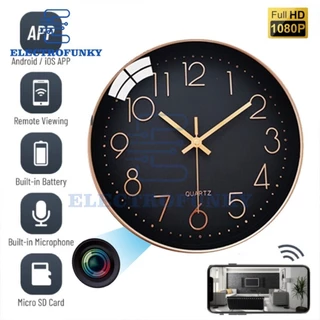
ที่ชาร์จ usb wifi เฝ้าบ้าน ภาพและเสียง ไม่หลุดสายตา เฝ้าบ้านแต่เรา ภาพคมชัด 2MP 2ล้านพิเซล แถมที่โอนข้อมูล
฿790
โค้ดส่วนลดร้านค้า
การจัดส่ง
ส่งฟรีทั่วประเทศ
รับของภายใน 2-4 วัน
การรับประกัน
ของแท้ 100% · เก็บเงินปลายทาง
จำนวน
มีสินค้า 1 ชิ้น
ราคาและสต็อกอาจเปลี่ยนแปลง — ตรวจสอบล่าสุดที่ Thaishops24
รายละเอียดสินค้า
WIFI support APP support,Look cam Video format: AVI Video encoding: M-JPEG Video resolution: 1920x1080/30 fps Audio: support Charging Voltag: 5V Interface type: Micro USB Memory storage: 16-128GB (FAT32) Pictures: no support Motion detection: Support H.264-1080P Remote Wireless Camera Operating Instructions Thank you for having chosen this product. This camera adopts a unique ultra-portable design, which enables it to be applied in various fields and brings you convenient, safe and colorful daily life. Please follow the steps in the instructions to set up your camera correctly. 1. Press the ON/OFF key to turn on the camera. Press the ON/OFF key for 3 seconds to turn it off. (When the camera is on, you may press Reset for 5 seconds to restart the camera for factory settings) I. Mode represented by key indicator Red light is power indicator, which is always on when the power is on. Blue light is WIFI indicator. Specific mode is as follows: 1. Point-to-point mode: Blue light flashes slowly 2. Configuration of remote camera completed: Blue light is always on If you are not clear what mode it is, reset the camera and switch to point-to-point mode. Note: This reset works only when the blue light is always on or flashes slowly. Press the Reset key for about 5 seconds until the indicators all go out, and let go until the camera starts (about 30 seconds). II. Download APP software (Figure 1) (Figure 2) Method 1. Scan the QR code (Figure 1), and enter the download page (Figure 2). Choose to download the software according to the system of the mobile phone. Download and install the computer client through the download address http://lookcam.ffvv.xyz:8800/lookcam_download.html Method 2. For Android, search for APP software called LOOKCAM on Google Play, and download and install it. For Apple, search for APP software called LOOKCAM in App Store, and download and install it. Note: If you scan with WeChat, when (Figure 2) appears, click the browser in sharing in the upper right corner to open and download the software. After downloading and installing, the following icon appears on the mobile phone III. Point-to-point connection of mobile phone to camera Enter the mobile phone WI-FI settings, find the WiFi account (UID number) and connect. As shown in the figure After the UID of the device is connected, open the phone APP (LOOKCAM). (As shown below) Click Cancel point-to-point short-range viewing (point-to-point is connected and viewing allowed) and click Yes to fast pair router and enter remote viewing (If you need to set up remote, please continue to read the instructions and follow the steps) IV. Set up the camera remote When point-to-point video can be viewed, return to the previous level and enter the interface as shown in the figure. Click the setup icon → Advanced Configuration →WiFi Connection Configuration → Find WiFi → Enter Password → Click OK and the camera will restart automatically. (Wait for the camera to restart (about 40 seconds). The camera will change from offline to online, at which time the viewable video can be accessed remotely.) Note: When connecting to remote, make sure you enter the correct WIFI password. Otherwise, the camera will restart automatically after clicking OK. However, due to the wrong password, the camera will not be online, and then you need to reset it and re-pair. Resolution Ratio 1080P/720P/640P/320P Video Format AVI Frame Number 25 Visual Angle 150 /90 degree Motion Detection Camera Shooting Straight line 6 meters Minimal Illumination 1LUX Video Duration Over 1 Hours Compressed Format H.264 Recording Range 5㎡ Consumption 380MA/3.7V Storage Temperature -20-80 degree centigrade Operating Temperature -10-60 degree centigrade Operation Humidity 15-85%RH Memory Card Type TF card Player Software VLCPlayer/SMPlayer Computer Operating System Windows/Mac OS X Mobile Phone Operating System Android/iOS Web browser IE7 and above,chrome,firefox safari.etc Largest customer 4 V. Specifications and parameters Reminder: What Micro SD Card is required for recording? Why can’t I use my Micro SD Card for recording? The camera supports up to 128 GB Micro SD card. Please use High Speed Class 10 FAT formatted memory card. You must format the Micro SD before using. If SD card is not recognized when inserted into camera, just remove and re-insert. Why can’t the camera go online? 1. Powerless. 2. Check if your router is working properly or not. 3. Weak Wi-Fi signal. 4. Wrong password wrong while Wi-Fi setting Why is remote monitoring not smooth? You should choose a suitable resolution to watch according to your internet speed. Why I can’t save to my SD card? SD Card must be formatted if this is your first time to use it. How do I when I forgot my password? Press reset key for 10 seconds and restore the factory setting. 5. The ini
ร้าน Tech Shop Good
★ 4.8